As an Amazon Associate, we earn from qualifying purchases. Some links may be affiliate links at no extra cost to you. Although our opinions are based on curated research, we haven't used these products. Articles generated with AI.


How Do I Prevent Carpal Tunnel Syndrome?

To prevent carpal tunnel syndrome, I prioritize an ergonomic workspace. I adjust my desk and chair to guarantee my wrists stay neutral, aligning my forearms with the keyboard. I practice proper hand positioning, keeping wrists straight and hands floating above the keyboard. Taking breaks every 30 minutes helps me avoid repetitive strain. I also make certain my tools are within easy reach to minimize awkward stretching. With these adjustments, I’ve seen significant improvements. There’s more to reflect on for overall wrist health.
Key Takeaways
- Maintain an ergonomic workspace with an adjustable desk and chair to support proper posture and wrist alignment.
- Position your monitor at eye level to promote neutral wrist posture and reduce strain.
- Take short breaks every 30 minutes to avoid fatigue and encourage wrist movement.
- Use ergonomic accessories like wrist rests and keyboard trays to alleviate wrist stress during use.
- Organize your workspace to keep tools within easy reach, reducing awkward stretching and strain.
Understanding Carpal Tunnel Syndrome
You may be interested



Carpal tunnel syndrome is a prevalent condition that affects many individuals, causing discomfort and functional limitations in the hand and wrist. It is vital to have symptom awareness, as early recognition can lead to better outcomes. This condition arises from nerve compression, specifically affecting the median nerve that runs through the wrist. Common symptoms include numbness, tingling, and pain, particularly in the thumb and index fingers. These sensations often worsen at night, disrupting sleep. Additionally, weakness in the hand can lead to dropping objects. Risk factors like repetitive motions, medical conditions, and gender can increase the likelihood of developing carpal tunnel syndrome. Understanding these aspects is important for effective prevention and management. Additionally, using an ergonomic chair with adjustable lumbar support can help promote better posture and reduce strain on the wrists during prolonged sitting.
Importance of Ergonomic Workspace Setup

Creating an ergonomic workspace is a key factor in preventing carpal tunnel syndrome and other musculoskeletal disorders. To start, using adjustable desks is vital. These desks allow me to switch between sitting and standing, helping maintain proper posture and reducing fatigue. I’ve found that when my wrists are in line with my forearms at the right desk height, it minimizes strain. Additionally, adjustable height desks promote better posture and productivity with sitting/standing options, further enhancing comfort during long hours of desk work. Investing in ergonomic chairs plays an important role. An adjustable chair guarantees my feet are flat on the floor, promoting better posture and reducing strain on my wrists and neck. With the right setup, I can customize my workspace for comfort, ultimately supporting my overall health and productivity while reducing the risk of developing chronic pain.
Recommended Products

Electric Height Adjustable Standing Desk for Comfortable Work - Switch effortlessly between sitting and standing with this electric standing desk. The smooth height adjustment from 28.35" to 46.46" helps promote a more comfortable working posture and keeps your energy flowing throughout the workday. Ideal for home offices, gaming setups, and productivity workspaces.

Ergonomic Drafting Chair:The ergonomic design adapts seamlessly to high drafting tables and standard office desks. The adjustable lumbar support benefits designers, architects, engineers, and office professionals by reducing fatigue over long work sessions.
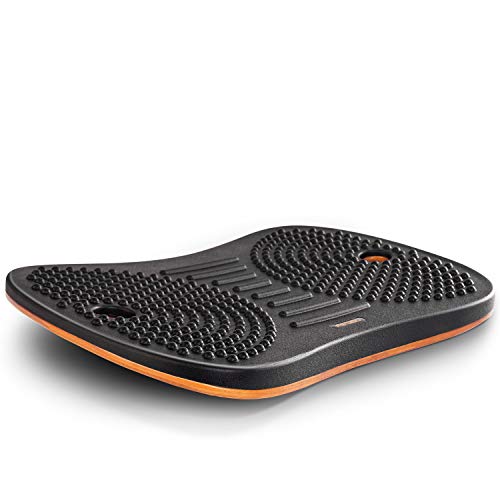
Wobble Board for Home & Office- Fezibo standing desk mat is a carefully engineered balance board that offers the perfect combination of stability and movement for the body. While standing on the board, even micro-movements can soothe stiff joints, promote blood circulation in the legs. Keep your legs, core, and body active while working, reading, watching TV, or playing video games. Also you can perform push-ups, squats, planks, and other exercises on it.
Hand and Wrist Positioning Techniques

Proper hand and wrist positioning is vital for reducing the risk of strain and injury during various tasks. To achieve ideal wrist alignment, I make sure my wrist is in line with my forearm, avoiding both upward and downward bending. I keep my forearms parallel or slightly lowered, adjusting my work surface so that my hands float comfortably above the keyboard or controls. It’s essential to maintain my arms at right angles to promote neutral alignment. I also avoid resting my wrists on hard surfaces and prefer using forearm support instead of wrist rests. By incorporating these techniques, I can greatly reduce strain and contribute to long-term wrist health. Additionally, using ergonomic footrests can further enhance overall posture while sitting, promoting better alignment and comfort.
Recommended Products

Ergonomic L-Shaped Elbow Pad: The L-shaped design snugly wraps around desk edges to provide comfortable arm and elbow support, reducing pressure and discomfort from prolonged contact while effectively relieving pain(11.8*3.9*1.3inch)

👍 【Premium Memory Foam with Cooling Gel Pad Top】 -- The inner core of BEAUTRIP office chair arm pads is made of 100 percent pure memory foam with moderate hardness which provides a cozy feeling with soft touch. The memory foam cushion includes a cooling gel insert on top to maximize comfort by keeping you cool and absorbing body heat to better adapt to your contours.

PLEASE MEASURE FIRST: Our pad size 9.5'' x 4.5'' x 1.5'' fits chair arms from 6 to 10.5 inches. As the pad is 9.5" in length and 4.5" in width, so if your stock armrest is any shorter and longer than these sizes, it won't be a prefect fit. If you need longer size, we have longer version which is 11" in length please find out it on our detail page or storefront. Please measure first before purchasing. Buy with confidence!
Reducing Repetitive Strain

Reducing repetitive strain is essential for maintaining long-term wrist health, especially if you frequently engage in tasks that require similar hand movements. To start, I recommend making workstation adjustments to promote a neutral wrist posture; this includes positioning your monitor at eye level and lowering your keyboard and mouse to keep your shoulders relaxed.
Incorporating task rotation into your routine can be incredibly beneficial. By alternating tasks, you can avoid prolonged repetitive motions that lead to strain. Additionally, taking short breaks every 30 minutes helps prevent fatigue and encourages movement.
Utilizing ergonomic accessories, like wrist rests and keyboard trays, can further alleviate stress on your wrists. For instance, using a KTRIO Ergonomic Keyboard Wrist Rest can help support a neutral wrist position and reduce typing-related pain. Remember, small adjustments can make a significant impact on your overall wrist health.
Recommended Products

【2-in-1 Keyboard Stand with Wrist Rest】Tired of constantly adjusting a misaligned wrist rest that slides out of place? Vaydeer keyboard wrist rest revolutionary one-piece design fuses the keyboard stand and wrist rest into a single, cohesive unit. This keyboard pad eliminates the frustrating gaps between your keyboard and cushion, ensuring a fluid typing motion without any interruptions.

[All-in-One Keyboard Stand Pad and Wrist Rest] This wrist rest for keyboard offers two tilt options (7° & 13.3°) for optimal ergonomic comfort. The angled design reduces strain on your wrists, forearms and elbows, helps treat and prevent carpal tunnel syndrome—perfect for long work or gaming sessions

【2-in-1 Keyboard Stand with Wrist Rest】Tired of constantly adjusting a misaligned wrist rest that slides out of place? Vaydeer keyboard wrist rest revolutionary one-piece design fuses the keyboard stand and wrist rest into a single, cohesive unit. This keyboard pad eliminates the frustrating gaps between your keyboard and cushion, ensuring a fluid typing motion without any interruptions.
Environmental and Behavioral Adjustments

How can we create a workspace that truly supports wrist health? First, consider desk and chair height adjustments. Keeping your forearms level with the keyboard will help maintain wrist neutrality. Additionally, workspace organization is essential; position your keyboard and mouse within easy reach to minimize awkward stretching.
Implement noise reduction strategies, such as using sound-absorbing materials or quiet equipment, to lower workplace stress that can exacerbate physical strain. Regularly check your office tools to guarantee they function smoothly, reducing unnecessary force when using them. Furthermore, incorporating ergonomic designs into your workspace, like an adjustable laptop stand, can enhance comfort and reduce strain on your wrists.
Lastly, take frequent breaks to allow your wrists to recover. By making these environmental and behavioral adjustments, we can create a healthier workspace that greatly reduces the risk of carpal tunnel syndrome.
Recommended Products

[Ergonomic Sliding Keyboard Tray] Enjoy a more ergonomic typing experience that reduces shoulder and wrist strain. The tray slides out smoothly and is easy to install, providing stable support for daily use. Keep your keyboard and mouse organized for a clean, efficient workspace at home, office, or gaming desk.

Ergonomic Keyboard and Mouse Tray: Installs underneath a standard desk for comfortable typing angles --Patent Pending--

Large & Practical Size – This full-size keyboard tray measures 25" × 9.84" (635 × 250 mm). It is ideally suited for keyboards measuring approximately 17.3" × 5.5" (440 × 140 mm) or smaller, with additional space for a mouse. Before purchasing, please compare your keyboard dimensions with the tray size and make sure you are comfortable with the remaining space available for mouse use. An included wrist rest provides added comfort during use. (Item weight: 10 lbs.)
Early Recognition and Lifestyle Factors

Recognizing the early signs of carpal tunnel syndrome (CTS) is essential, as timely intervention can prevent the condition from worsening. The early symptoms often start gradually, like tingling and numbness in my thumb, index, middle, and ring fingers. These sensations, especially at night, can serve as red flags. Additionally, I’ve noticed mild discomfort or a burning sensation in my hands during repetitive activities such as typing or using handheld devices.
It’s vital to be aware of risk factors. Repetitive motion, poor posture, and a sedentary lifestyle can increase susceptibility to CTS. By acknowledging these early symptoms and adjusting my lifestyle accordingly, I can help protect my hands and promote overall nerve health.
Recommended Products

[All-in-One Keyboard Stand Pad and Wrist Rest] This wrist rest for keyboard offers two tilt options (7° & 13.3°) for optimal ergonomic comfort. The angled design reduces strain on your wrists, forearms and elbows, helps treat and prevent carpal tunnel syndrome—perfect for long work or gaming sessions
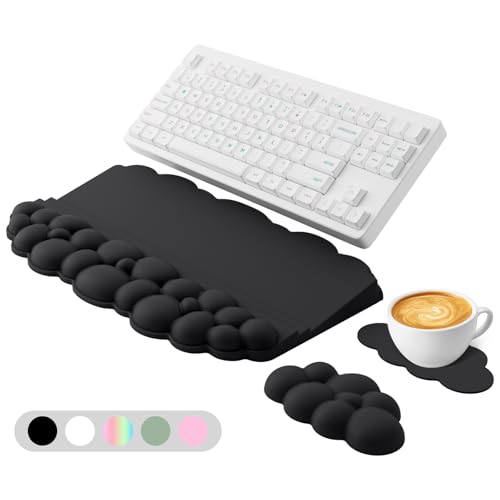
[All-in-One Keyboard Stand Pad and Wrist Rest] This wrist rest for keyboard offers two tilt options (7° & 13.3°) for optimal ergonomic comfort. The angled design reduces strain on your wrists, forearms and elbows, helps treat and prevent carpal tunnel syndrome—perfect for long work or gaming sessions

【Softer and More Comfortable】Vaydeer wrist rest has unique diamond pattern, which is the combination of softness and aesthetics. The materials of wrist rest are improved into higher quality memory foam and covered with silky smooth lycra. The computer wrist rest makes you as comfortable and cushiony as like rest your wrists on clouds.
Frequently Asked Questions
What Are the Common Symptoms of Carpal Tunnel Syndrome?
I’ve noticed common symptoms of carpal tunnel syndrome include numbness, tingling, and weakness in my fingers. symptom awareness and early detection are essential; they can help prevent long-term damage and improve hand function markedly.
How Can I Strengthen My Hands and Wrists?
I focus on hand exercises and wrist stretches daily. Towel squeezes and finger extensions really help strengthen my grip, while wrist rotations keep everything flexible. It’s made a noticeable difference in my overall hand strength!
When Should I See a Doctor for Wrist Pain?
When it rains, it pours! If you’re feeling persistent wrist pain that doesn’t improve, or if you notice swelling or limited mobility, it’s time for a doctor consultation. Don’t wait too long!
Are There Specific Occupations at Higher Risk for Carpal Tunnel Syndrome?
I’ve noticed that office workers are especially vulnerable to carpal tunnel syndrome due to repetitive tasks. It’s essential to be aware of these risks and take steps to protect our wrists during daily activities.
Can Carpal Tunnel Syndrome Be Reversed With Treatment?
Carpal tunnel syndrome’s complexities can sometimes be conquered with careful treatment options. I’ve learned that early intervention is key; addressing symptoms promptly may prevent further damage and enhance recovery, providing hope for relief and restoration.
{
“@context”: “https://schema.org”,
“@type”: “FAQPage”,
“mainEntity”: [
{
“@type”: “Question”,
“name”: “What Are the Common Symptoms of Carpal Tunnel Syndrome?”,
“acceptedAnswer”: {
“@type”: “Answer”,
“text”: “I’ve noticed common symptoms of carpal tunnel syndrome include numbness, tingling, and weakness in my fingers. symptom awareness and early detection are essential; they can help prevent long-term damage and improve hand function markedly.”
}
},
{
“@type”: “Question”,
“name”: “How Can I Strengthen My Hands and Wrists?”,
“acceptedAnswer”: {
“@type”: “Answer”,
“text”: “I focus on hand exercises and wrist stretches daily. Towel squeezes and finger extensions really help strengthen my grip, while wrist rotations keep everything flexible. It’s made a noticeable difference in my overall hand strength!”
}
},
{
“@type”: “Question”,
“name”: “When Should I See a Doctor for Wrist Pain?”,
“acceptedAnswer”: {
“@type”: “Answer”,
“text”: “When it rains, it pours! If you’re feeling persistent wrist pain that doesn’t improve, or if you notice swelling or limited mobility, it’s time for a doctor consultation. Don’t wait too long!”
}
},
{
“@type”: “Question”,
“name”: “Are There Specific Occupations at Higher Risk for Carpal Tunnel Syndrome?”,
“acceptedAnswer”: {
“@type”: “Answer”,
“text”: “I’ve noticed that office workers are especially vulnerable to carpal tunnel syndrome due to repetitive tasks. It’s essential to be aware of these risks and take steps to protect our wrists during daily activities.”
}
},
{
“@type”: “Question”,
“name”: “Can Carpal Tunnel Syndrome Be Reversed With Treatment?”,
“acceptedAnswer”: {
“@type”: “Answer”,
“text”: “Carpal tunnel syndrome’s complexities can sometimes be conquered with careful treatment options. I’ve learned that early intervention is key; addressing symptoms promptly may prevent further damage and enhance recovery, providing hope for relief and restoration.”
}
}
]
}